Help & FAQ
Everything you need to know about using the Perham GBB Shot Tracker.
Getting Started
The Perham GBB Shot Tracker helps players track their shooting practice, set goals, earn badges, and see how they compare with teammates. Parents can follow along and log shots for their kids too.
After creating an account and logging in, you'll land on your Shot Tracker dashboard. From there you can log shots, check stats, view goals, and see your badges.
How to Create an Account
Registration is a quick two-step process:
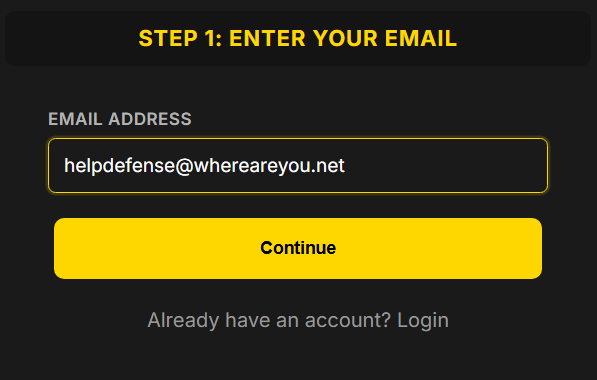
Step 1: Enter Your Email
Go to the registration page and enter your email address.
Step 2: Complete Your Profile
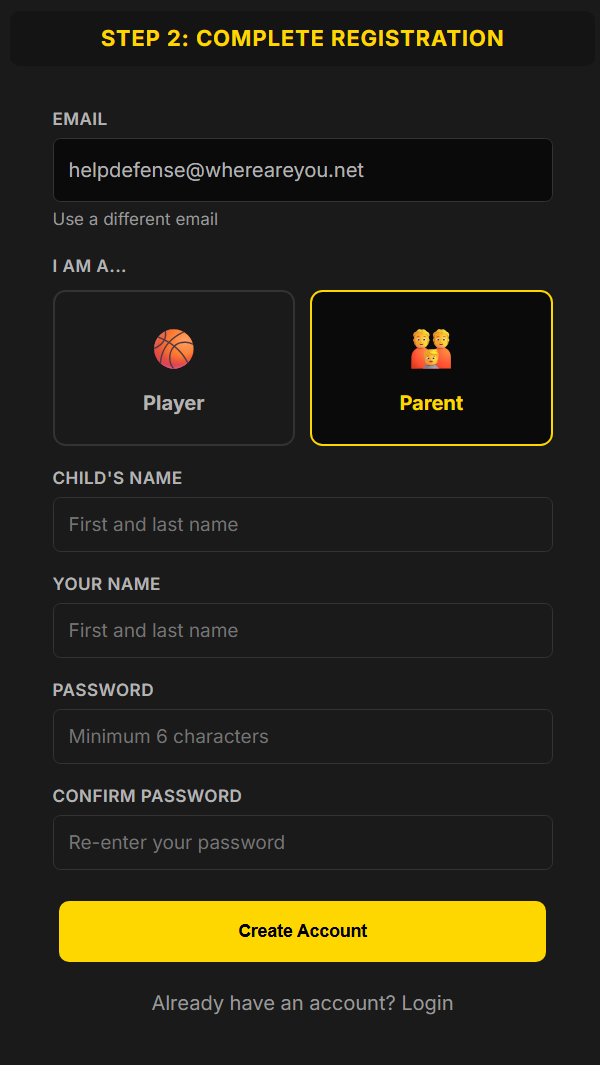
Choose whether you're a Player or a Parent, enter your name, and create a password (minimum 6 characters).
If you're a parent, you'll also enter your child's name so the coaches can link your accounts.
What Happens Next?
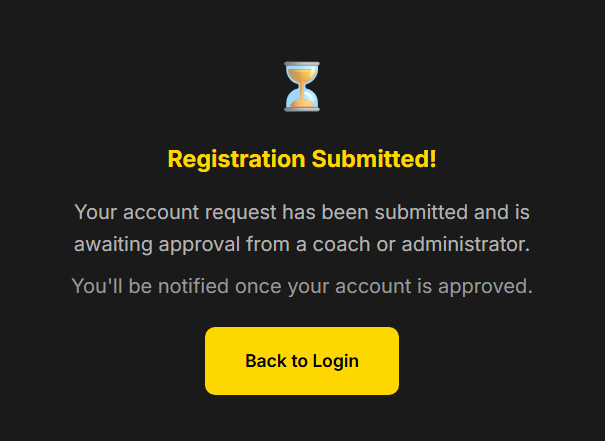
If your email was pre-approved by a coach, you're in right away. Otherwise, a coach will review and approve your account. You'll see this confirmation:
How to Log Shots
Quick Log (Fastest Way)
- Go to Shot Tracker from the menu.
- Enter the number of shots you made and tap Log Shots.
- That's it! Your shots are recorded for today.
Detailed Log (More Options)
- Tap Detailed Log on the dashboard.
- You can set the date (for logging a past session), time, and number of shots.
- Add tags like Free Throws, Three Pointers, or Layups to categorize your session.
- Add optional notes about what you worked on.
Tip: Try to log your shots right after each practice session so you don't forget!
Viewing Your Stats
Tap My Stats on the dashboard to see your full stats breakdown:
- This Week / This Month / Season — how many shots in each time period
- Lifetime Total — every shot you've ever logged
- Current Streak — how many days in a row you've logged shots
- Personal Best — your biggest single session
- Charts — see your shooting trends over time
- Session History — a list of every session with dates and details
Setting Goals
Tap My Goals on the dashboard to manage your shooting goals.
Perham Team Goal
Every player has a team goal of 10,000 shots for the summer (April 1 – August 31). A progress bar shows how close you are, how many days are left, and how many shots per day you need to stay on track.
Personal Goals
You can create your own goals with the Create New Goal form. Choose a preset duration:
- Week — 7-day challenge
- Month — 30-day goal
- Summer — April 1 through August 31
- Year — full year target
- Career — long-term goal with no end date
- Custom — pick your own start and end dates
Personal Records
Below your goals you'll see your personal bests: lifetime total, best summer, best day, best week, and best month.
Earning Badges
Tap Badges on the dashboard to see all the badges you can earn. Badges are awarded automatically when you hit certain milestones.
Badge Categories
- Milestone — total shots: 100, 500, 1K, 5K, 10K, all the way up to 200K career
- Consistency — number of sessions logged: 10, 25, 50, 100
- Streak — consecutive days logging shots: 3, 7, 14, 30 days
- Session — shots in a single session: 100, 200, 500
Medal Tiers
Some badges have Bronze, Silver, and Gold versions. For example, log 10 sessions with 100+ shots for Bronze, 25 for Silver, and 50 for Gold. Streak badges have medal tiers too.
There are also a few surprise badges to discover on your own. Locked badges show a progress bar so you can see how close you are. Keep shooting!
Editing or Deleting a Session
- Go to My Stats and find the session in the Session History table.
- Tap Edit next to the session you want to change.
- You can update the number of shots, date, time, tags, and notes.
- To delete a session, scroll to the bottom of the edit page and tap Delete.
- You'll be asked to confirm before anything is deleted.
For Parents
Parents can view and manage their child's shot tracker. Here's how it works:
- When you register, select Parent and enter your child's name.
- Once a coach links your account to your child, you'll automatically see their data when you visit the Shot Tracker, Stats, Goals, and Badges pages.
- If you have multiple kids on the team, use the dropdown at the top of the page to switch between them.
- You can log shots for your child from the dashboard — great for younger players.
- You can also edit or delete their sessions and manage their goals.
Don't see your child's data? Contact a coach to get your accounts linked.
Account & Password
- To change your password, go to Account in the menu.
- Forgot your password? Tap "Forgot your password?" on the login page.
- You'll stay logged in until you tap Logout — no need to log in every time.
- If your account is pending approval, check back later or ask your coach.
Team Overview
Tap Team on the dashboard to see how the whole team is doing:
- Team totals — combined shots for the season and week
- Leaderboard — see who's putting in the most work
- Activity feed — recent sessions from all players
Need More Help?
If you're having trouble or have a question not covered here, send us a message and we'll get back to you.